An OpenDSS GUI you draw in
OpenDSS is a scripting tool. You describe a feeder as text, New Line.L1
bus1=... bus2=..., run it, and read numbers back. That is powerful, and it is
also the reason so many people ask the same question on the OpenDSS forums:
is there a graphical interface where I can just draw the circuit?
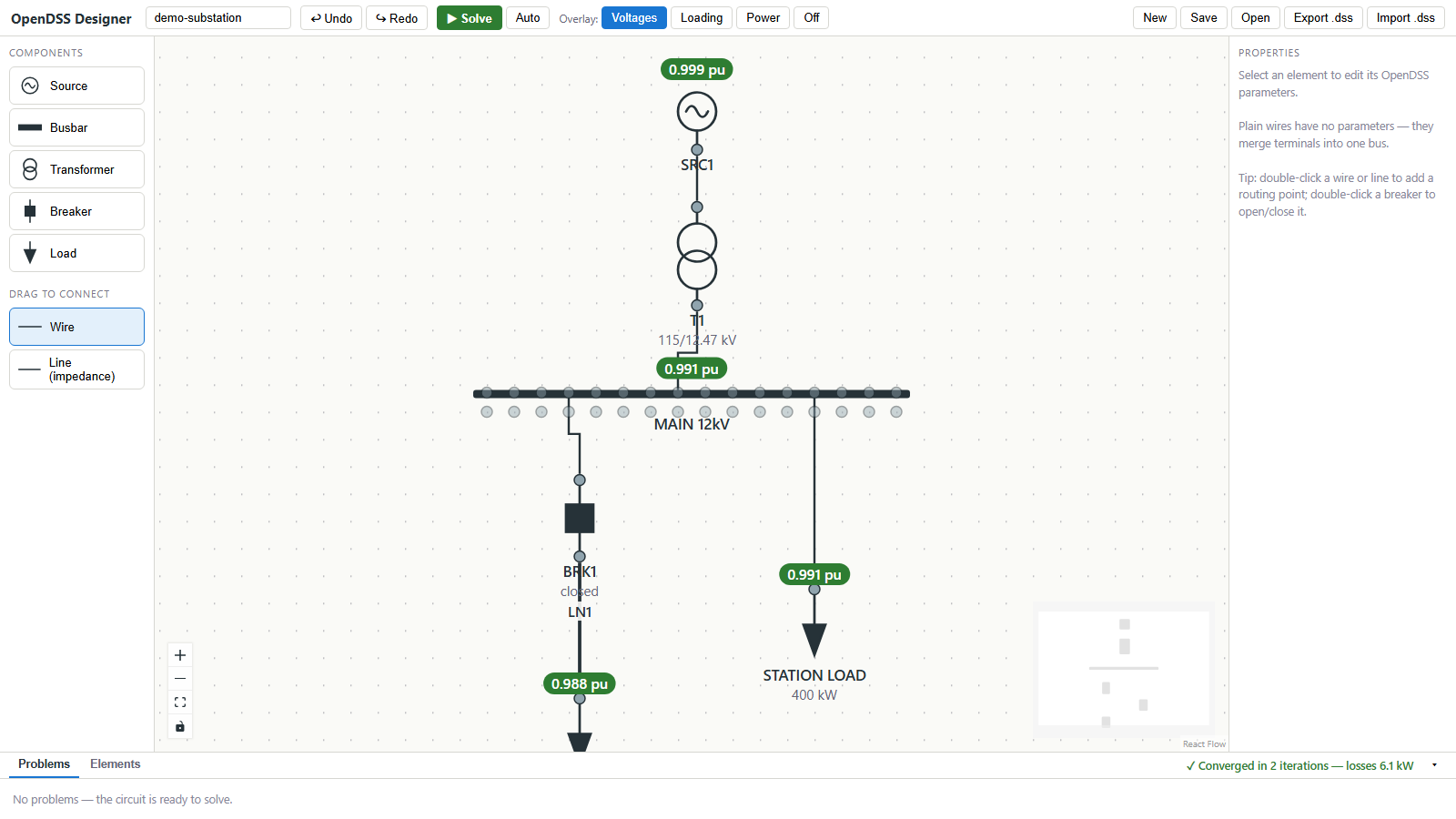
OpenDSS Designer is that interface. You place a source, a transformer, a busbar and some loads, wire them up, press Solve, and the bus voltages, element loading and any violations appear on the diagram. The drawing is not a picture of a model kept somewhere else. It is the model: every solve compiles the diagram into OpenDSS commands and runs the real engine.
What it does
- Draws the one-line. Sources, busbars, two-winding transformers, breakers, lines with impedance, loads, capacitors, generators, PV systems and storage, placed with a click and wired by dragging. Busbars stretch; symbols rotate; wires re-route by grabbing an end.
- Solves on the drawing. A snapshot power flow returns per-bus voltage in per unit, per-element loading, real and reactive flows, losses, and a fault-current study, each as an overlay on the diagram with hover details. Auto-solve re-runs on every edit if you want it.
- Runs time series. A day or a year of operation with load shapes, solar irradiance and storage dispatch, then a scrubber that walks the diagram through the recorded results. Public NREL building load profiles and NSRDB irradiance can be pulled in by climate zone and location.
- Reads and writes
.dss. Import an existing feeder, includingredirectfiles, and get an automatically laid-out diagram. Export a runnable.dssscript that is byte-for-byte what the built-in solver ran. - Edits in bulk. A spreadsheet view of every element with fill-down, for the parts of the job that are faster in a table than on a canvas.
How it compares
OpenDSS ships with a Windows program that is a script editor with plotting; EPRI also publishes OpenDSS-G, a Windows application with a graphical circuit view. OpenDSS Designer differs in three ways: it runs in a browser on any operating system, the diagram is the primary way of building the model rather than a view of a scripted one, and it is open source under the AGPL. It also does less: it covers the elements a substation or a small feeder needs and not, yet, regulators, relays or three-winding transformers. The comparison page goes through this properly.
Two ways to use it
Install it. Python 3.10 or later, then:
pip install opendss-designer
opendss-designer
A local server starts and your browser opens. Nothing leaves your machine; circuits are saved in your browser and exported as files when you want them.
Or use the hosted copy. opendssdesigner.ryanmsparks.com runs the same software with nothing to install. It is free with limits on circuit size and solver time; a free account raises them, and a paid plan raises them further for people doing real studies. Circuits are never stored on the server in any plan.
Where to go next
- Getting started: a five-minute walkthrough from an empty canvas to a solved feeder.
- Components: every element and its OpenDSS parameters.
- Time-series analysis: daily and yearly simulation.
- Importing DSS files: bringing an existing model in.
- Source on GitHub and the package on PyPI.